Norton Ghost 15.0.0.35659 (2010) Full Serial Crack is Professional Grade Backup and Recovery
Key Technologies
* NEW! Cold imaging * NEW! Blu-ray Disc support * NEW! Windows® 7 Bitlocker%u2122 support * NEW! Symantec ThreatCon integration * Advanced compression and encryption * File and folder backups
Features Norton Ghost 15.0.0.35659 (2010) Full Serial Crack :
* NEW! Cold Imaging lets you back up files without installing Ghost. * NEW! Blu-ray Disc allows you to back up large amounts of data to high-capacity Blu-ray Disc %u2014 up to 25 GB per disc (50 GB dual-layer). * NEW! Windows® 7 support including support for Bitlocker%u2122 provides enhanced data protection through drive encryption and integrity checking.
System Requirements
Windows® 7 Starter/Home Basic/Home Premium/Professional/Enterprise/Ultimate * Must meet minimum Windows 7 operating system requirements
Windows Vista® Home Basic/Home Premium/Business/Ultimate * Must meet minimum Windows Vista operating system requirements
Windows® XP Home/Professional
* 300 MHz or faster processor * 512 MB (1GB recommended) of RAM * 430 MB of available hard disk space * CD-ROM or DVD-ROM drive for software distribution on media * Super VGA (800 x 600) or higher resolution video adapter and monitor
Keamanan dan “kesehatan” computer sangat mutlak diharapkan dan diperlukan oleh semua pengguna computer agar dalam beraktifitas menggunakan computer menjadi lebih nyaman dan aman. Banyak cara dan jalan yang digunakan agar computer tetap sehat dan dalam kondisi dan performa yang fit. Salah satunya adalah mencegah serangan dari virus-virus yang berbahaya dengan menggunakan antivirus yang selalu update tentunya. Dari sekian banyak cara penyebaran virus yang menginfeksi computer, yang paling banyak dan efisien adalah melalui media penyimpanan atau removable disk ( flashdisk ).
Flashdisk yang terinfeksi virus akan dengan mudah menginfeksi computer lain saat flashdisk dicolokkan kemudian mengakses ataupun saat membuka file diflashdisk. Dari satu computer ke computer lain flashdisk ini mengambil virus kemudian menularkannya kepada computer yang lainnya lagi.
Demi keamanan dari serangan virus melalui flashdisk, sangat disarankan agar sebelum mengakses flashdisk selalu dan selalu melakukan scanning terhadap flashdisk tersebut. Mengandalkan antivirus saja tidak cukup. Sebaiknyalah sahabat coba tools yang satu ini yang benar-benar free dan portable, jadi tidak membebani kinerja computer. Dan lagi tools ini juga ampuh membersihkan virus yang terdapat dalam flashdisk, karena tools ini memang dikhususkan untuk membasmi virus yang ada di flashdisk, tidak di harddisk. Beberapa contoh virus yang menyerang melalui flashdisk ini adalah autoruns.inf, auto.exe, autorun.ini, ctfmon.exe, copy.exe, Macromedia_Setup.exe, ntde1ect.com, New Folder.exe, soundmix.exe, svchost.exe, semo2X.exe, windows.scr dan lain-lain.
Tools yang hanya berukuran 746 KB ini bernama ninja pendisk. Saat dijalankan tools ini akan berjalan pada system tray dan bisa diatur agar berjalan saat startup, automatic clean dan mendisable autoplay dengan klik kanan pada icon di system tray tersebut. Cara kerjanyapun sangat mudah. jalankan tools ini kemudian colokkan flashdisk anda, maka tools ini akan segera bekerja dan membersihkan flashdisk dari virus yang dikenali'
You've invested a lot of money to get the best hardware. Unfortunately, you might not be taking full advantage of all the speed and power that you paid for. Even the most experienced users have difficulty controlling all the resources and settings on a PC - all the while giving up valuable speed and system stability. Now, you can get a faster, cleaner, and safer PC within minutes - without being a Windows expert! RamCleaner automatically finds the best settings for your PC and carefully controls your system resources to give you the best performance. Easy to use, this award-winning utility has all the features you could ever need to clean up your system, monitor resources, and improve performance.
Key Features in RamCleaner :
Memory Optimization at your fingertips! RamCleaner makes it easier than ever before to free up unused RAM, prevent crashes and increase performance. This ensures that you always have enough memory to run your favorite applications without running into any problems. You can free the memory with a single click. RamCleaner shows various information on your memory usage. To optimize RAM just adjust the slider in Ram to Free and press Clean now ! button on the bottom and RamCleaner will do the rest.
Prioritize Windows System Functions Assign more resources to Windows and you can prevent crashes caused by a single application taking control over the CPU, preventing the Windows shell from working properly.
Processes Manager RamCleaner has inbuilt task Manager. It shows which applications are currently running on your system. It also allows you to close or change priority on running applications.
Clean Memory at Interval Automatically clean memory at selected interval in minutes. Clean when memory is reached Automatically clean if memory reached on selected size (Mbytes). Set Optimal Set the optimal RamCleaner settings for best performance your PC!
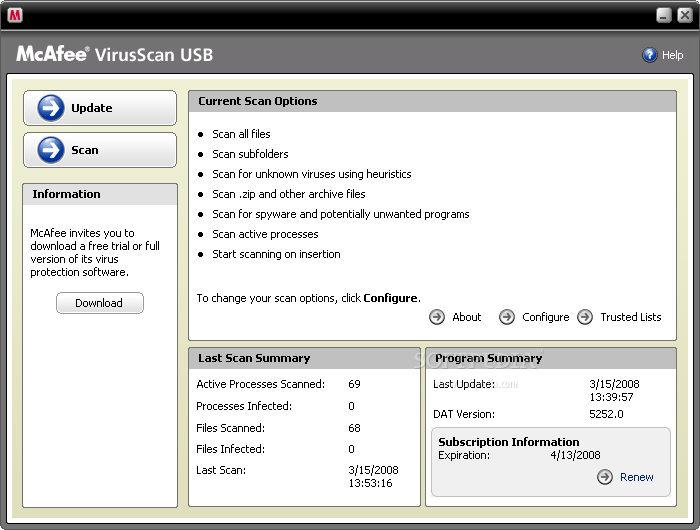
Proven security that protects your USB drive against viruses, McAfee VirusScan USB detects and removes viruses that can delete files and data from your USB drive. Additionally, this software ensures that your USB drive does not transmit viruses and other threats to each PC that you plug your USB drive into.
The data on your USB drive is vulnerable to viruses and other potential threats. Even if you have anti-virus software on your PC, you also need to protect the USB drive.
Whether you use your USB drive simply to share music and photos with friends and family, transfer data between work and home PCs, or use it as a mobile computing platform, you need to know that your fi les and identity are safe. For these reasons, it is essential to have antivirus protection for your USB drive.
The McAfee VirusScan USB application was designed to detect and remove viruses and Trojans that can delete important files and data from your USB drive. VirusScan USB leverages McAfee VirusScan’s award-winning threatprevention technology and ensures that your USB drive does not transmit viruses when plugging into PCs.
Specifically designed to protect your U3-enabled USB drive, this software:
* Protects irreplaceable files kept on your U3 smart drive, such as family photos and personal financial documents * Cleans virus threats automatically * Helps Prevent the spread of viruses from infected PCs to your U3 smart drive * Scans the PC that you plug your U3 smart drive into for virus protection * Updates automatically to protect against new threats
Here are some key features of “McAfee VirusScan USB”:
* On-Insertion and On-Demand Anti-Virus Protection. * Protects irreplaceable files kept on your U3 smart drive, such as family photos and personal fi nancial documents. * Active Protection. * McAfee’s on-the-fly protection · automatically detects and eradicates viruses, using background scans whenever fi les are changed or added to your USB drive. * McAfee VirusCarrier Guard. * Helps prevent your U3 smart drive from acting as a carrier of viruses that can be transmitted when you plug into a PC. * Automatic Scanning of PCs For Current Anti-Virus Protection. * Helps prevent the spread of viruses from infected PCs to your U3 smart drive. * Virus Security Alerts. * Automatically notifies you of potential threats. * Automatic Updates. * Helps protect your U3 smart drive from emerging new threats.
Virus memang menjadi sesuatu yang menakutkan dalam segala hal, termasuk virus komputer yang saat ini sedang merajalela menyerang system komputer di seluruh dunia. Virus komputer sendiri jenisnya bermacam-macam dan diklasifikasikan berdasarkan karakteristiknya, seperti Spyware, Malware,Virus, Trojan, dan masih banyak yang lain. Bagi Anda yang masih menggunakan OS Windows, Antivirus adalah software yang paling penting yang harus Anda miliki. Hal ini untuk menghindari komputer dari serangan berbagai macam virus jahat yang siap menyerang komputer Anda.
Mengingat semakin banyaknya jenis virus yang menyerang system operasi Windows, maka Antivirus pun juga tidak mau kalah, banyak macam antivirus, baik itu buatan dalam negeri maupun buatan luar negeri yang siap mencegah dan membasmi virus-virus jahat yang akan merusak komputer kita. Dan berikut ini adalah Top 10 Antivirus 2011.
10 Antivirus Terbaik 2011
1.Bitdefender Antivirus
•Threat Detection: Virus, Worm, Trojan, Spyware, Malware, Rootkit. •Additional Protection: Browser exploit, OS exploit, Keyloggers, inbound email protection, outbond email protection, instant messaging protection, p2p/file sharing, registry startup protection, dialers, backdoors, hackers, phising, identity theft protection, adware, activex, vulnerabilities, cookies, scripts, full web protection, auto usb detect. •Protection Technology: Virus signatures, whitelisting, heuristic, real time. •Supported OS: XP (32 & 64 bit), Vista (32 & 64 bit), Windows 7 (32 & 64 bit)
This DVD5 ISO image file contains the security updates for Windows released on Windows Update on December 14th, 2010. The image does not contain security updates for other Microsoft products. This DVD5 ISO image is intended for administrators that need to download multiple individual language versions of each and that do not use an automated solution such as Windows Server Update Services (WSUS). You can use this ISO image to download multiple updates in all languages at the same time.
Supported Operating System Windows XP - 24 languages Windows XP x64 Edition - 2 languages Windows Server 2003 - 18 languages Windows Server 2003 x64 Edition - 11 languages Windows Server 2003 for Itanium-based Systems - 4 languages Windows Vista - 36 languages Windows Vista for x64-based Systems - 36 languages Windows Server 2008 - 19 languages Windows Server 2008 x64 Edition - 19 languages Windows Server 2008 for Itanium-based Systems - 4 languages Windows Server 2008 R2 x64 Edition - 19 languages Windows Server 2008 R2 for Itanium-based Systems - 4 languages Windows 7 - 36 languages
Windows 7 for x64-based Systems - 36 languages This DVD5 image contains the following updates: KB2416472 / (MS10-070) Windows XP Windows XP x64 Edition Windows Server 2003 Windows Server 2003 x64 Edition Windows Server 2003 for Itanium-based Systems Windows Vista Windows Vista for x64-based Systems Windows Server 2008 Windows Server 2008 x64 Edition Windows Server 2008 for Itanium-based Systems Windows Server 2008 R2 x64 Edition Windows Server 2008 R2 for Itanium-based Systems Windows 7 Windows 7 for x64-based Systems KB2160841 / (MS10-077) Windows XP x64 Edition Windows Server 2003 x64 Edition Windows Server 2003 for Itanium-based Systems Windows Vista for x64-based Systems Windows Server 2008 x64 Edition Windows Server 2008 for Itanium-based Systems Windows Server 2008 R2 x64 Edition Windows Server 2008 R2 for Itanium-based Systems Windows 7 for x64-based Systems KB979688 / (MS10-083) Windows Vista Windows Vista for x64-based Systems Windows Server 2008 Windows Server 2008 x64 Edition KB2416400 / (MS10-090) Windows XP Windows XP x64 Edition Windows Server 2003 Windows Server 2003 x64 Edition Windows Server 2003 for Itanium-based Systems Windows Vista Windows Vista for x64-based Systems Windows Server 2008 Windows Server 2008 x64 Edition Windows Server 2008 for Itanium-based Systems Windows Server 2008 R2 x64 Edition Windows Server 2008 R2 for Itanium-based Systems Windows 7 Windows 7 for x64-based Systems KB2296199 / (MS10-091) Windows XP Windows XP x64 Edition Windows Server 2003 Windows Server 2003 x64 Edition Windows Server 2003 for Itanium-based Systems Windows Vista Windows Vista for x64-based Systems Windows Server 2008 Windows Server 2008 x64 Edition Windows Server 2008 for Itanium-based Systems Windows Server 2008 R2 x64 Edition Windows Server 2008 R2 for Itanium-based Systems Windows 7 Windows 7 for x64-based Systems Windows Embedded Standard 7 Windows Embedded Standard 7 for x64-based Systems KB2305420 / (MS10-092) Windows Vista Windows Vista for x64-based Systems Windows Server 2008 Windows Server 2008 x64 Edition Windows Server 2008 for Itanium-based Systems Windows Server 2008 R2 x64 Edition Windows Server 2008 R2 for Itanium-based Systems Windows 7 Windows 7 for x64-based Systems Windows Embedded Standard 7 Windows Embedded Standard 7 for x64-based Systems KB2447961 / (MS10-094) Windows XP Windows Server 2003 Windows Server 2003 x64 Edition Windows Vista Windows Vista for x64-based Systems Windows Server 2008 Windows Server 2008 x64 Edition KB2385678 / (MS10-095) Windows Server 2008 R2 x64 Edition Windows Server 2008 R2 for Itanium-based Systems Windows 7 Windows 7 for x64-based Systems Windows Embedded Standard 7 Windows Embedded Standard 7 for x64-based Systems KB2423089 / (MS10-096) Windows XP Windows XP x64 Edition Windows Server 2003 Windows Server 2003 x64 Edition Windows Server 2003 for Itanium-based Systems Windows Vista Windows Vista for x64-based Systems Windows Server 2008 Windows Server 2008 x64 Edition Windows Server 2008 for Itanium-based Systems Windows Server 2008 R2 x64 Edition Windows Server 2008 R2 for Itanium-based Systems Windows 7 Windows 7 for x64-based Systems Windows Embedded Standard 7 Windows Embedded Standard 7 for x64-based Systems KB2443105 / (MS10-097) Windows XP Windows XP x64 Edition Windows Server 2003 Windows Server 2003 x64 Edition Windows Server 2003 for Itanium-based Systems KB2436673 / (MS10-098) Windows XP Windows XP x64 Edition Windows Server 2003 Windows Server 2003 x64 Edition Windows Server 2003 for Itanium-based Systems Windows Vista Windows Vista for x64-based Systems Windows Server 2008 Windows Server 2008 x64 Edition Windows Server 2008 for Itanium-based Systems Windows Server 2008 R2 x64 Edition Windows Server 2008 R2 for Itanium-based Systems Windows 7 Windows 7 for x64-based Systems Windows Embedded Standard 7 Windows Embedded Standard 7 for x64-based Systems KB2440591 / (MS10-099) Windows XP Windows XP x64 Edition Windows Server 2003 Windows Server 2003 x64 Edition Windows Server 2003 for Itanium-based Systems KB2442962 / (MS10-100) Windows Vista Windows Vista for x64-based Systems Windows Server 2008 Windows Server 2008 x64 Edition Windows Server 2008 for Itanium-based Systems Windows Server 2008 R2 x64 Edition Windows Server 2008 R2 for Itanium-based Systems Windows 7 Windows 7 for x64-based Systems Windows Embedded Standard 7 Windows Embedded Standard 7 for x64-based Systems KB2207559 / (MS10-101) Windows Server 2003 Windows Server 2003 x64 Edition Windows Server 2003 for Itanium-based Systems Windows Server 2008 Windows Server 2008 x64 Edition Windows Server 2008 R2 x64 Edition KB2345316 / (MS10-102) Windows Server 2008 x64 Edition Windows Server 2008 R2 x64 Edition
XP-AntiSpy adalah sebuah Software utilities kecil yang memungkinkan Anda menonaktifkan beberapa built-in 'fitur' update dan authetication di WindowsXP.
Sebagai contoh, ada sebuah layanan yang berjalan di latar belakang yang disebut 'Automatic Updates'. I don `t tahu apa ini transfer layanan dari mesin saya ke mesin lain di internet, terutama yang MS. Jadi saya bermain fungsi tersebut aman dan menonaktifkan.
Jika Anda suka, Anda bahkan dapat menonaktifkan fungsi ini secara manual, dengan pergi melalui Sistem dan mencentang atau menghapus centang beberapa checkbox. Ini akan membawa Anda sekitar setengah jam. Tapi kenapa buang-buang waktu ketika sebuah utilitas rapi kecil dapat melakukan hal yang sama dalam 1 menit?
XP-Antispy Portable telah berhasil diuji dengan banyak pengguna dan ditemukan untuk menonaktifkan semua Fungsinya yang dikenal 'Mencurigakan' di WindowsXP
This program - Drive to restore, scan, treatment system in the event of infection. Avira AntiVir Rescue System starts automatically and runs from the BIOS. Created based on Linux. Program interface is English. The structure of the disc is a full anti-virus scanner.
Kaspersky (All Versions) Working Keys [07/01/2011] | 5.77 MB 100 % Latest Working Keys For All versions of Kaspersky...
How To Install: 1. Disable your internet connection 2. Delete previous license 3. Activate using the including code in the folder (you must be disconnected from the internet) the kaspersky will inform you that it can't verify the license and asks you to Browse for an existing license from your folders 4. Navigate to the licenses folder & use a working one 5. Update Kaspersky database
For Kaspersky 2011:
Below is a 100% working trick to activate latest version of KAV/KIS 11.0.1.400 using a license key file. Check the new method below:
Activating Kaspersky 2011 license using key file:
1. Open Kaspersky 2011 License Manager (from lower right corner). 2. Click ‘Activate the application with a new license’ button. (Delete any trial key first if you want, by clicking the red X next to the key). 3. Select ‘Activate commercial version’ and enter the activation license code as 11111-11111-11111-1111X 4. Click Next, an error dialog box will open saying ‘wrong activation code’ as shown: 5. Click Ok and you will then get the option to activate kaspersky using a key file. 6. Browse to the key location on your computer and activate kaspersky.
Kaspersky Password Manager is an indispensable tool for the active Internet user. It fully automates the process of entering passwords and other data into websites and saves the user going to the trouble of creating and remembering multiple passwords. When you use Kaspersky Password Manager to log in, you can rest assured that your data is safe. The software creates exceptionally strong passwords and prevents your login information from being stolen. All confidential data is encrypted and kept in a dedicated database on your computer. Kaspersky Password Manager makes your web experience safer, quicker and more convenient
Main Features
* Sign-in with a single click of the mouse Kaspersky Password Manager remembers your usernames and their associated passwords so that when you return to a site it will provide your login data automatically. Kaspersky Password Manager also works with applications that require authentication. * Reliable protection for your passwords Kaspersky Password Manager securely stores your passwords and personal data in a dedicated, encrypted database on your computer. The stored passwords can only be deciphered by the use of a master password or another authentication method defined by the user. This ensures that your passwords are secure and prevents criminals from stealing them. * Supports various methods of authentication Kaspersky Password Manager helps you to control access to your password database with a master password or by using a USB or Bluetooth device. You can even use your mobile phone: your passwords can be configured so that they are only available when your mobile phone is connected to your computer via Bluetooth. If you leave your computer and take your phone with you, the database will automatically lock itself. * Generation of strong passwords The security of your data depends directly on how strong your passwords are. Users often have similar or identical passwords for multiple accounts. By cracking a single password, a cybercriminal can easily gain access to many accounts. The password generator integrated into Kaspersky Password Manager will create strong passwords for you that are extremely difficult to crack. * Import passwords from other operating systems and applications With Internet Explorer or Mozilla Firefox, passwords are stored in an unprotected format and can easily be accessed by cybercriminals. Kaspersky Password Manager helps you to locate these unprotected passwords and import them into the encrypted password database. * Mobile version Kaspersky Password Manager’s mobile version provides access to your passwords while working on any computer, without having to install a thing. The mobile version can be launched from different types of mobile devices, including flash drives. If the device is then removed, Kaspersky Password Manager locks the password database automatically and removes any trace of your password data from the host machine. * Automatically completes lengthy forms Website forms often require the entry of personal information over and above that of username and password. Such additional data may include: your full name, date of birth, sex, email address, phone number, country of residence, etc. Kaspersky Password Manager can automatically fill in these kinds of forms for you, using information that you provide beforehand. Several ID cards can be used to store business-related and personal information separately. * Several usernames for a single account provider Sometimes, several passwords must be stored for a single website. For example, you may have several mailboxes, each with a different purpose, registered with a single mail service provider. Kaspersky Password Manager can store several usernames for a single provider and check which one you want to use when you sign in. * Automatic backup Kaspersky Password Manager automatically creates a backup copy of your password database on your computer each time it is modified. You can easily restore your passwords if the current database is accidentally damaged, or if you want to roll back to a previous version. * Effective protection against keyloggers A keylogger is a malicious program that tracks keystrokes on the victim’s computer to illegally capture the user’s personal data, such as passwords. Kaspersky Password Manager enters passwords without actually using the keyboard and so effectively protects your personal data from keyloggers. * Protection from phishing attacks Phishing is a type of hostile activity whereby a cybercriminal invites the user to visit a website in order to trick the user into divulging their account information. The fake site looks identical to the original site and an unwitting user consequently supplies their personal data. Kaspersky Password Manager effectively counters phishing attacks by checking if the URL is authentic and if your software is up-to-date.
Copy crack file overwrite the original one in your install dir folder *C:\Program Files\Kaspersky Lab\Kaspersky Password Manager
Anti-Logger, developed to thwarts attacks from various kinds of malware threats, proactively protects your "Information Security" without needing a signature-based algorithm by using powerful anti-action methods. Anti-Logger prevents attacks from all known forms of malware which are designed to perform information theft. Anti-Logger uses a proactive and unique way to detect potentially harmful applications which have not already been recognized or identified by anti-virus programs. Consequently, it protects your "Information Security" from a wide range of threats. Anti-Logger employs a brand new and powerful protection method against unknown malwares which cannot be caught by well-known and very commonly used security software. To examine closely the superior power of Anti-Logger, and to test the various protection modules, or to understand how your security software protects your system, visit"simulation test program" pages.
Key Features: - SSL Logger Protection Prevents theft of data exchanged via secure connections (HTTPS/SSL) - Key Logger Protection Prevents all harmful applications from logging your keystrokes(thereby stealing your passwords and account info) - Screen Logger Protection Prevents harmful applications from capturing your computer screen. - WebCam Logger Protection Prevents any harmful applications from monitoring your Web Camera. - ClipBoard Logger Protection Prevents harmful applications from taking snapshots of your clipboard. - System Defense Tracks down Windows operating system activity in real-time to prevent detrimental actions from various malware and spyware programs.
Ganjin's Kaspersky 2011 TR v1.5p - resets the trial period, to have more time to assess Kaspersky 2011 v11.0.2.556 and PURE v9.1.0.124. Retrieved on WinXP/Vista/7.
This program is for Kaspersky 2011 v11.0.2.556 and PURE v9.1.0.124. It resets the trial period so you have more time to evaluate the product. It was tested on WinXP/Vista x86 and Win7 x64. It may not work with newer or older versions of Kaspersky. This program requires WinXP/Vista/7 and the Net Framework 3.0. I recommend you to buy Kaspersky after you evaluated it.
NEW in 1.5p: Just some improvements.
Install Notes 1. Disable the Self-Defense of Kaspersky in the settings. 2. Exit Kaspersky by using the trayicon. 3. Start ganjin_ktr_2011.exe and press the "Reset" button. 4. Wait for Kaspersky to launch and activate the trial version. 5. OPTIONALLY: Use the NagScreen remover. Done!
.Version 1.5p - 28-12-2010 - (1.52) ADD - Info label in the top groupbox CHG - Removed the startup window IMP - Nagscreen remover now also re-enables the self-defense IMP - Reset methode on all operation systems FIX - Reset not working on some systems (???)
Kaspersky Rescue Disk is designed for testing and treatment of infected computers. The application is used when it is not possible to cure your computer with antivirus applications or utilities of treatment (eg, Kaspersky AVPTool), run under the operating system. The effectiveness of treatment is enhanced by the fact that in the system are malicious programs do not receive control during system startup. The program is an iso-image multiboot disk. To work with him, you need to burn an ISO image to CD disc, then insert the disc in CD-ROM, and boot from it. Set the BIOS to boot from CD-ROM. Enter the BIOS menu when you can strarte computer by pressing the "Delete" or "F2", depending on the motherboard. In the future you do not have to wait 2-5 minutes., The program will create an information environment itself will launch startup screen anti-virus.
OS: Windows XP, Vista, Win 7 Update: 02.01.2011 Format: ISO image Interface: English | Russian | German | French
Home Page : http://support.kaspersky.com/viruses/rescuedisk
Stopzilla - a program that will provide you with convenient and safe operation of the Internet. STOPzilla is integrated into the browser and ad blocking pop-ups, prevents the penetration of the computer spyware: Adware, Spyware, Trojans, etc., as well as on-demand has cleared the browser history and the removal of C. If necessary, STOPzilla can start to load Windows.
Anti-Spyware Made Easy * Detects, blocks, and quarantines Spyware and Adware in true real time. * Four configurable types of on-demand and automatic Spyware scanning. * Can be set to update automatically or on demand for optimal protection. * Advanced Pop-up protection blocks ads that slow down your surfing. * Kills browser hijackers, removes rootkits, prevents botnet attacks. * Blocks Phishing attacks, protects from malicious Web sites.
Award-winning Technology * Kills all forms of Malware... STOPzilla successfully scans, removes and blocks Spyware, Adware, Pop-up ads, Phishing attacks, hijackers, rootkits, Trojans, bots, drive-by downloads, rogue programs, messenger service ads, keyloggers, malicious BHOs, dialers, and much more. * Comprehensive Online Security... Our commitment to excellence has resulted in numerous awards and recognition from a wide variety of publications and software testing organizations around the world. STOPzilla's technology has protected users from Spyware / Adware in over 60 countries and has been downloaded by more than 15 million users, worldwide.
Scans, Removes, and Blocks Spyware * True Real-timeTM Protection... STOPzilla's True Real-Time protection detects, blocks, and quarantines both known and potential Spyware infections before they can attack your system and do damage. Legitimate software programs are allowed to execute freely. From the moment you start your computer, STOPzilla is working to protect you from malicious programming, so your PC is never vulnerable. * Most advanced Pop-up blocker available... STOPzilla's highly advanced Pop-up blocker intercepts and destroys all forms of Pop-up advertisements while allowing user-requested Pop-ups to display. STOPzilla has the intelligence to distinguish legitimate Pop-ups (banking sites, e-mail, etc.) from annoying Pop-up Ads. Not all Pop-up blockers were created equal. Basic Pop-up blockers will not block Pop-ups delivered by Spyware / Adware applications. STOPzilla's award-winning Pop-up blocking technology will block both Web site spawned Pop-ups and well as Pop-ups launched by Spyware / Adware applications. * Simple to use... STOPzilla has been specifically designed to perform effectively regardless the user's level of computer expertise. Upon boot-up, STOPzilla starts and requires very little user interaction. With STOPzilla, your time can be spent surfing the Web, not worrying about Spyware and Adware. * Frequent Auto-updates & Free Tech Support... STOPzilla's Spyware / Adware research team sends out updates as often as every day to ensure that your PC security is never compromised and always protected against the latest threats. Any problem or question can be resolved free of charge by STOPzilla Customer Support. Support options include chat, e-mail, online Help and toll-free calls.
System Requirements STOPZilla is compatible with Windows XP, Windows 2000, Vista, and Windows 7.
Install Notes: 1. Install STOPzilla! 3.1.0.7. 2. When installation is completed, click CONTINUE USING STOPzilla "Register later - 15 day limit". 3. If STOPzilla! propose download and install new version, click "No". 4. Close STOPzilla!, and make sure that nothing related to it is running. 5. Extract "STOPZilla_Activator.rar" & Run the included "activator.exe". 6. Run STOPzilla, and restart. 7. When Windows is up and settled, install STOPZilla v5.0.82.1, and let it update. 8. When installation is completed, you'll have the latest STOPzilla! version registered.
Wondershare Time Freeze with the revolutionary new interface, is more powerful virtual system software, yet, as easy-to-use as the 1.0 version. Utilizing more advanced virtualization technology, it can provide higher-level security to computer, enhance MBR protection, and greatly improve the efficiency of virtual system. Time Freeze is also more flexible to save or discard virtual system data, and you can set different mode for folder protection.
Easy switch between virtual system and real system:
To enter virtual system, you don't need to reboot computer; to return to real system, just exit System Protection, and you can save or discard virtual system data freely.
Effective virtual system tool:
Time Freeze creates a virtual environment as a twin (copy) of the real system, on which you evaluate applications, watch movies, and perform online activities. While the real system is under protection, you no longer have to worry about viruses, spyware, malware and other threats.
MBR protection: Time Freeze 2.0.3 enhanced protection to the boot sector of hard disk so as to guarantee the normal startup of system.
Virtual system performance increased 60%:
Physical Memory Buffer Mode lets you save virtual system data on physical memory rather than on the hard disk, so as to greatly improve the efficiency and performance of virtual system.
Prolong service life of hard disk:
Using Physical Memory Buffer Mode can minimize the frequency of writing/reading hard disk and prolong its service life.
USB stick protection:
Prevent virus/malware threats from USB sticks to infect your computer, and prevent authorized users to copy your important files using USB sticks.
More robust folder protection:
Improved software kernel of Folders Protection brings higher-level security to folders and files in them. Protect files against virus and malicious threats more effectively.
Protect your privacy: Prohibit unauthorized others to view or make change to files in the protected folders.
Easily manage folders: Support changing the icon of protected folders, so it will be clear for you to manage them.
More flexible protection options: Time Freeze 2.0.3 supports setting different protection mode for different folders, while Time Freeze 1.0 only allows users to set the same protection mode for all folders.
New intuitive interface: The interface of Time Freeze 2.0.3 is a completely new design, which makes it more intuitive than Time Freeze 1.0.
Support 64-bit OS: The easy-to-use virtual system program added support to 64-bit OS, including 64-bit of Windows 7, XP and Vista.
Flashing system tray icon is gone: Annoyed by the flashing system tray icon? It is gone in Time Freeze 2.0.3. You can set to auto hide the tray icon. And just press Alt+Ctrl+F8 to show/hide system tray icon.
Automatic system detect:
During the installation process, it will automatically detect if there is similar software already installed on your computer, and provide corresponding solution.
Key Features & Benefits of Time Freeze: » Keep system safe from threats of viruses, spyware, worms, Trojans, etc. » Enter virtual system in 2 clicks, no need to reboot computer » Easy system restore and recovery to remove all problems » Surf internet safely, and test software & game installations without fear » Robust MBR protection guarantees the normal startup of PC » New protection mode greatly improves efficiency of virtual system » System Protection » Folder Protection » Password Protection » Change Icon of Protected Folder » MBR Protection » Physical Memory Buffer Mode » Customizable Folder Protection Mode » USB Stick Protection » Hide System Tray Icon » Support 32-bit OS » Support 64-bit OS » Friendly Interface
What's New of Wondershare Time Freeze 2.0.3 • Updated the brand VI. • Updated the copyright information for 2011. • Modified the Buy and Update links to Wondershare.com. • Added Support Center and Contact Customer Service links in Help menu.





 Norton Ghost 15.0.0.35659 (2010) Full Serial Crack is Professional Grade Backup and Recovery